> ## Documentation Index
> Fetch the complete documentation index at: https://docs.boble.io/llms.txt
> Use this file to discover all available pages before exploring further.
# Transactions
> Track every payment received: status, fees breakdown, payout availability, and receipts.
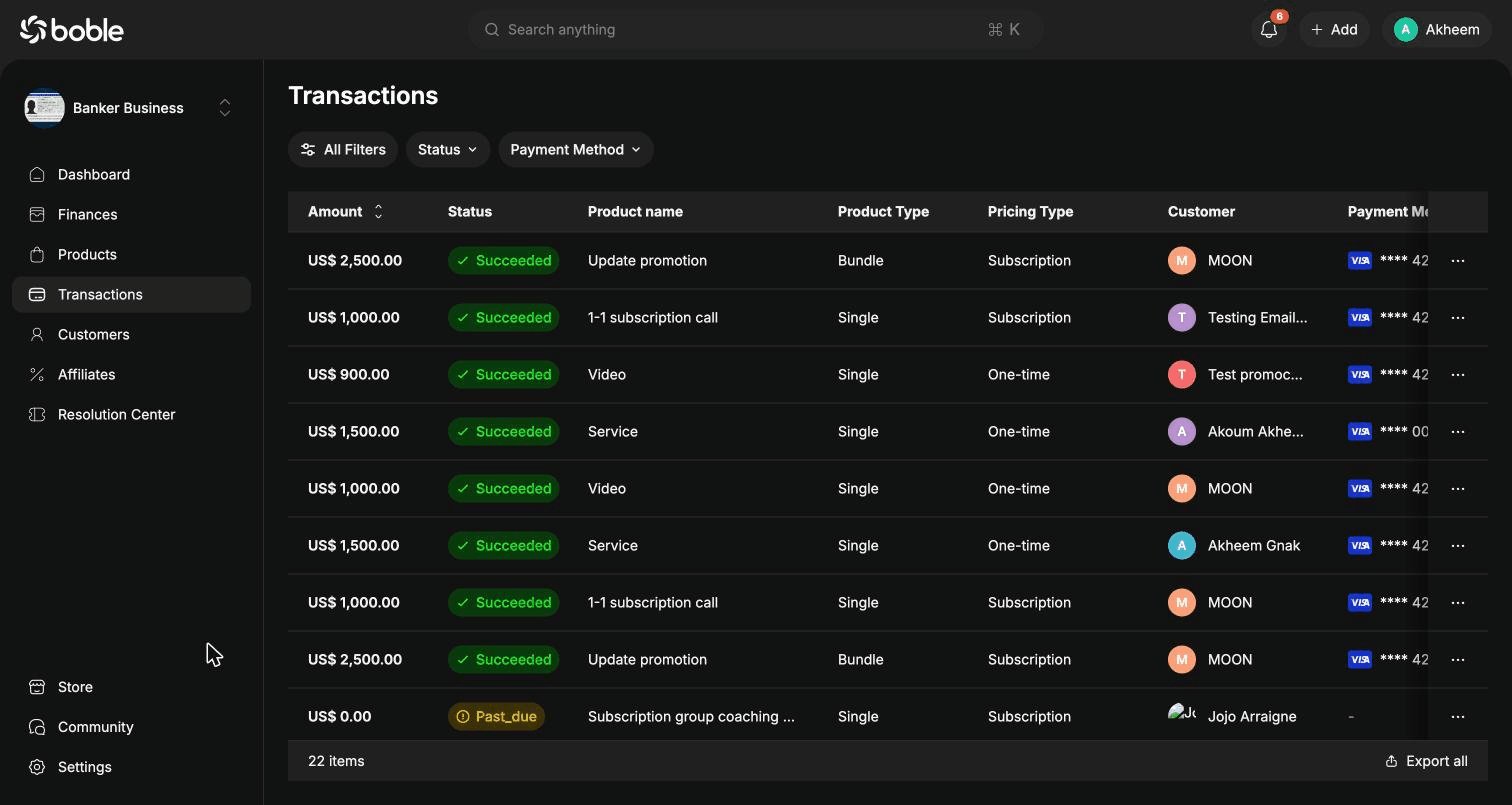
The **Transactions** page ([admin.boble.io/transactions](https://admin.dev.boble.io/transactions)) lists every payment made on your products and bundles, across all payment methods.
 ## Transaction list
Use the filter bar (**All Filters**, **Status**, **Payment Method**) to narrow down the list, and **Export all** to download it.
| Column | Description |
| -------------------- | ------------------------------------------------------------ |
| **Amount** | Amount paid by the customer (sortable). |
| **Status** | `Succeeded`, `Past_due` (subscription payment overdue), etc. |
| **Product name** | The purchased product or bundle. |
| **Product Type** | `Single` or `Bundle`. |
| **Pricing Type** | `One-time` or `Subscription`. |
| **Customer** | The buyer, with avatar. |
| **Payment Method** | Card brand and last 4 digits (e.g. Visa \*\*\*\* 4242). |
| **Transaction Time** | Relative time of the payment (e.g. "4 days ago"). |
## Row actions
The `⋯` button at the end of each row opens the actions menu:
## Transaction list
Use the filter bar (**All Filters**, **Status**, **Payment Method**) to narrow down the list, and **Export all** to download it.
| Column | Description |
| -------------------- | ------------------------------------------------------------ |
| **Amount** | Amount paid by the customer (sortable). |
| **Status** | `Succeeded`, `Past_due` (subscription payment overdue), etc. |
| **Product name** | The purchased product or bundle. |
| **Product Type** | `Single` or `Bundle`. |
| **Pricing Type** | `One-time` or `Subscription`. |
| **Customer** | The buyer, with avatar. |
| **Payment Method** | Card brand and last 4 digits (e.g. Visa \*\*\*\* 4242). |
| **Transaction Time** | Relative time of the payment (e.g. "4 days ago"). |
## Row actions
The `⋯` button at the end of each row opens the actions menu:
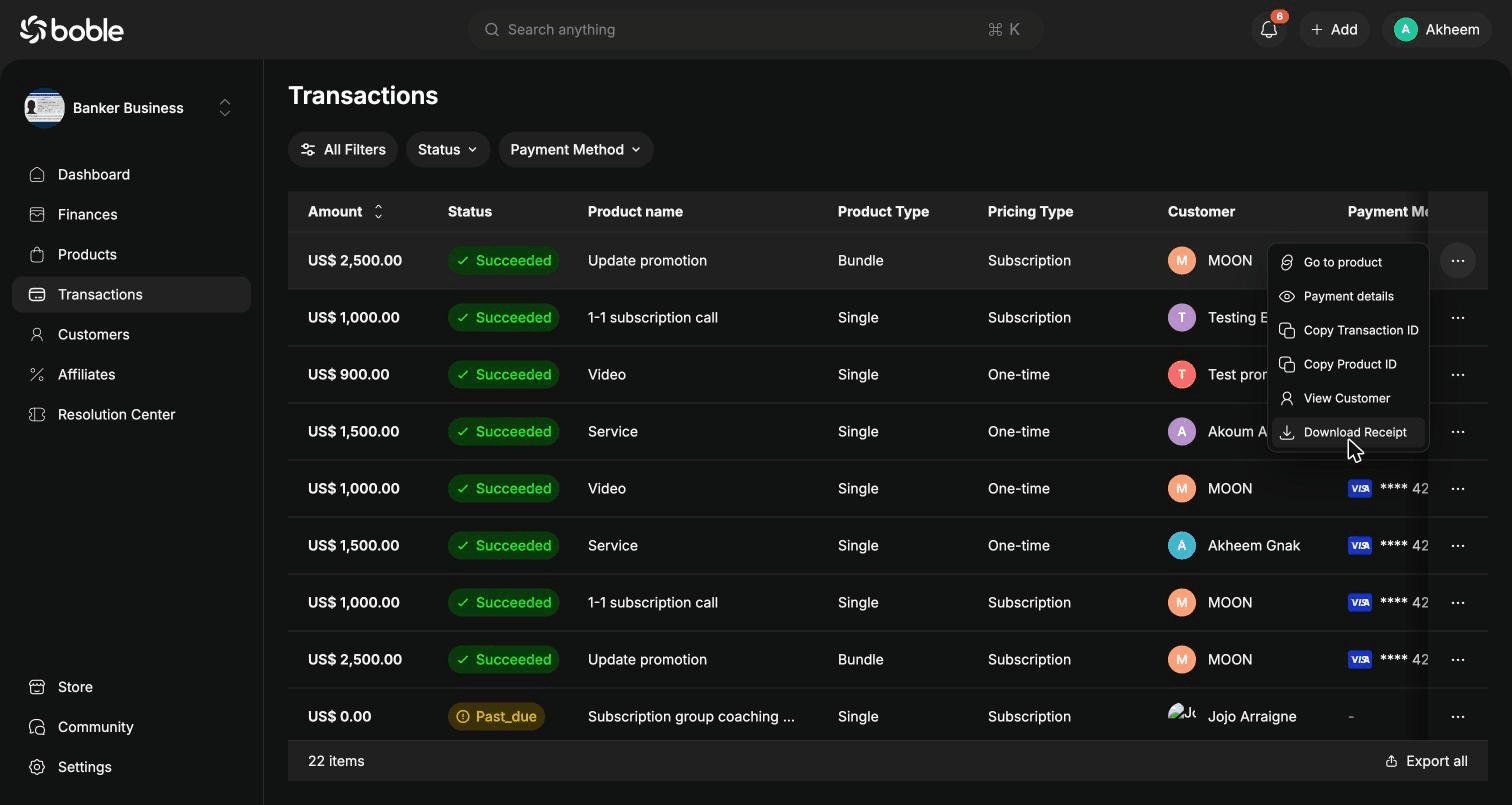 | Action | Description |
| ----------------------- | ----------------------------------------------- |
| **Go to product** | Open the detail page of the purchased product. |
| **Payment details** | Open the transaction details modal (see below). |
| **Copy Transaction ID** | Copy the transaction's unique ID. |
| **Copy Product ID** | Copy the product's unique ID. |
| **View Customer** | Open the customer's profile. |
| **Download Receipt** | Download the payment receipt. |
## Transaction details
Click a row (or **Payment details** in the actions menu) to open the details modal:
| Action | Description |
| ----------------------- | ----------------------------------------------- |
| **Go to product** | Open the detail page of the purchased product. |
| **Payment details** | Open the transaction details modal (see below). |
| **Copy Transaction ID** | Copy the transaction's unique ID. |
| **Copy Product ID** | Copy the product's unique ID. |
| **View Customer** | Open the customer's profile. |
| **Download Receipt** | Download the payment receipt. |
## Transaction details
Click a row (or **Payment details** in the actions menu) to open the details modal:
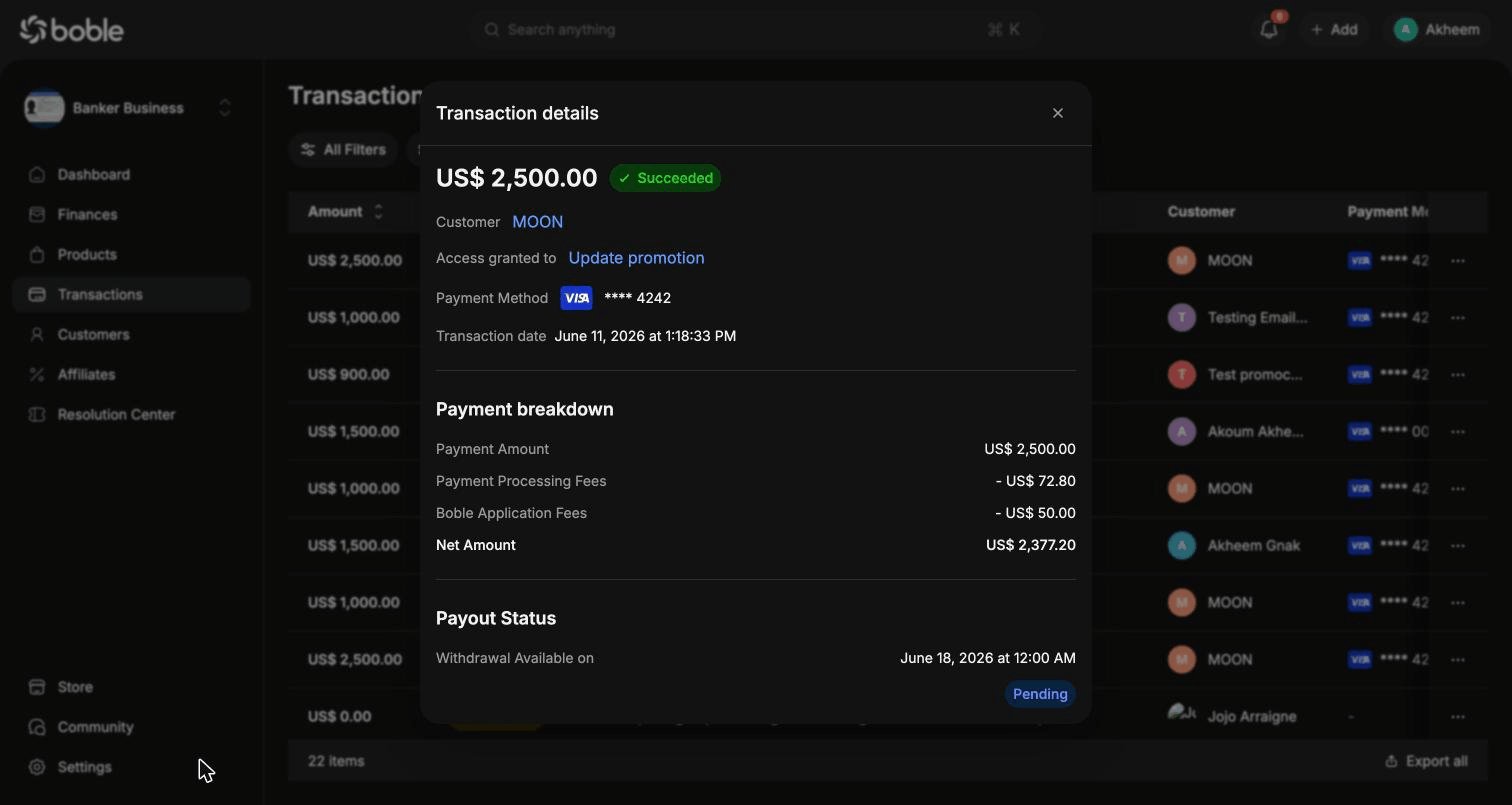 * **Header** — amount, status badge, customer (link to profile), **Access granted to** (link to the purchased product), payment method, and exact transaction date.
* **Payment breakdown** — how the gross amount splits up:
* **Payment Amount** — what the customer paid
* **Payment Processing Fees** — processor fees (deducted)
* **Boble Application Fees** — Boble platform fees (deducted)
* **Net Amount** — what you actually receive
* **Payout Status** — when the money becomes available for withdrawal (**Withdrawal Available on**) and its current state (e.g. `Pending`).
* **Header** — amount, status badge, customer (link to profile), **Access granted to** (link to the purchased product), payment method, and exact transaction date.
* **Payment breakdown** — how the gross amount splits up:
* **Payment Amount** — what the customer paid
* **Payment Processing Fees** — processor fees (deducted)
* **Boble Application Fees** — Boble platform fees (deducted)
* **Net Amount** — what you actually receive
* **Payout Status** — when the money becomes available for withdrawal (**Withdrawal Available on**) and its current state (e.g. `Pending`).