> ## Documentation Index
> Fetch the complete documentation index at: https://docs.boble.io/llms.txt
> Use this file to discover all available pages before exploring further.
# Finances
> Manage your balance, wallets, payouts, and deposits from the Boble admin panel.
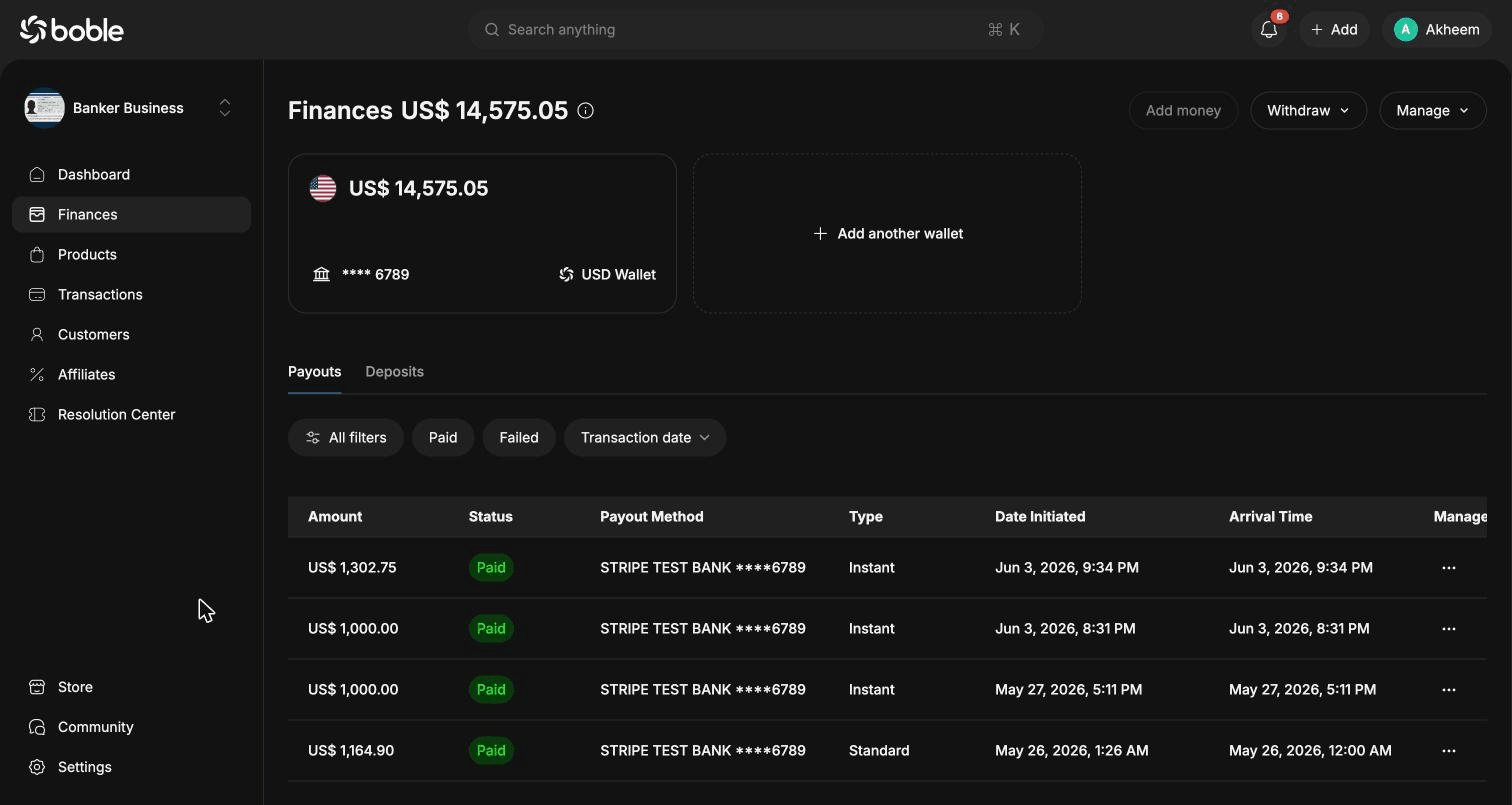
The **Finances** page ([admin.boble.io/finances](https://admin.dev.boble.io/finances)) is where you manage your money: current balance, wallets, payout history, and deposits.
 ## Balance and actions
The page title shows your **total available balance** (e.g. US\$ 14,575.05). Next to it, three actions are available:
| Action | Description |
| ------------- | ------------------------------------------- |
| **Add money** | Top up your balance. |
| **Withdraw** | Withdraw funds to your linked bank account. |
| **Manage** | Manage your wallets and payout settings. |
## Wallets
Each wallet card shows its currency, current balance, and the **linked bank account** (masked number, e.g. \*\*\*\* 6789). Click **Add another wallet** to create a wallet in another currency.
## Payouts tab
The **Payouts** tab lists every payout sent to your bank account. You can narrow down the list with the filter bar:
* **All filters** — advanced filtering
* **Paid** / **Failed** — filter by status
* **Transaction date** — filter by date range
Each row of the table contains:
| Column | Description |
| ------------------ | -------------------------------------------------------------------------------------------------------------- |
| **Amount** | Payout amount (e.g. US\$ 1,302.75). |
| **Status** | `Paid` or `Failed`. |
| **Payout Method** | Destination bank account (e.g. STRIPE TEST BANK \*\*\*\*6789). |
| **Type** | `Instant` or `Standard`. Instant payouts arrive immediately; standard payouts arrive on the next business day. |
| **Date Initiated** | When the payout was created. |
| **Arrival Time** | When the funds arrived (or are expected to arrive). |
| **Manage** | Row actions menu (`⋯`). |
Use **Export all** at the bottom of the table to download the full payout history.
## Deposits tab
The **Deposits** tab lists payments received into your balance, with the same table structure (Amount, Status, Payout Method, Date Initiated, Arrival Time). When you have not received any payments yet, the tab shows *"No deposit yet — When you receive payments, they will be displayed here as deposits."*
## Balance and actions
The page title shows your **total available balance** (e.g. US\$ 14,575.05). Next to it, three actions are available:
| Action | Description |
| ------------- | ------------------------------------------- |
| **Add money** | Top up your balance. |
| **Withdraw** | Withdraw funds to your linked bank account. |
| **Manage** | Manage your wallets and payout settings. |
## Wallets
Each wallet card shows its currency, current balance, and the **linked bank account** (masked number, e.g. \*\*\*\* 6789). Click **Add another wallet** to create a wallet in another currency.
## Payouts tab
The **Payouts** tab lists every payout sent to your bank account. You can narrow down the list with the filter bar:
* **All filters** — advanced filtering
* **Paid** / **Failed** — filter by status
* **Transaction date** — filter by date range
Each row of the table contains:
| Column | Description |
| ------------------ | -------------------------------------------------------------------------------------------------------------- |
| **Amount** | Payout amount (e.g. US\$ 1,302.75). |
| **Status** | `Paid` or `Failed`. |
| **Payout Method** | Destination bank account (e.g. STRIPE TEST BANK \*\*\*\*6789). |
| **Type** | `Instant` or `Standard`. Instant payouts arrive immediately; standard payouts arrive on the next business day. |
| **Date Initiated** | When the payout was created. |
| **Arrival Time** | When the funds arrived (or are expected to arrive). |
| **Manage** | Row actions menu (`⋯`). |
Use **Export all** at the bottom of the table to download the full payout history.
## Deposits tab
The **Deposits** tab lists payments received into your balance, with the same table structure (Amount, Status, Payout Method, Date Initiated, Arrival Time). When you have not received any payments yet, the tab shows *"No deposit yet — When you receive payments, they will be displayed here as deposits."*